
Skip to navigation Skip to main content
Word For Businesses
  • Home
  • My GUARANTEE
  • About
  • Case Studies
  • Testimonials
  • Shop
    • Free Kindle Template
    • Free How to Self-Publish Book
    • Business Templates
    • Business Pack (BIG SAVINGS)
    • Fiction Templates
    • Non-Fiction Templates
    • Resumes
  • Courses
    • Introduction to Microsoft Word
    • Working with Word Images
    • Microsoft Word Fundamentals
    • Self-publishing on KDP
    • Free How to Self-Publish Book
    • Free Kindle Template
  • Blog
  • FAQs
  • Work with me
Menu
Word For Businesses
Microsoft Word Background

Blog

HomeBlogPage 3
13 Quick Tips - Introduction
author-avatar Russ Crowley
0
13 Quick Tips
26 Apr 2020
23 January 2024

13 Tips to Getting the Best out of Microsoft Word

I wrote an article on Linked in (click here) about some tips to getting better with Microsoft Word. I hop...
Continue reading
13 QuickTips Styles
author-avatar Russ Crowley
0
13 Quick Tips, Word Tips
24 Apr 2020
23 January 2024

Tip #1 – Word’s Styles

Here we look at THE most important element of Microsoft Word - styles. Forget what anyone else has taught ...
Continue reading
13 Quick Tips - Direct Formatting
author-avatar Russ Crowley
0
13 Quick Tips, Word Tips
22 Apr 2020
23 January 2024

Tip #2 Direct Formatting (is a no-no in Microsoft Word)

I could rock a lot of boats in this video as this'll probably go against the grain of everything you know (or ...
Continue reading
13 Quick Tips - The Normal Style
author-avatar Russ Crowley
0
13 Quick Tips, Word Tips
18 Apr 2020
23 January 2024

Tip #3 – Normal style

Don’t use it. The Normal style, that is. This one: This may (or may not) shake your very Word founda...
Continue reading
13 Quick Tips - Insert Pictures
author-avatar Russ Crowley
0
13 Quick Tips, Word Tips
14 Apr 2020
23 January 2024

Tip #4 – Insert Pictures

Pictures are the bane of many a Microsoft Word author and document... Have you ever moved an image on a pag...
Continue reading
13 Quick Tips - Fast Formatting
author-avatar Russ Crowley
0
13 Quick Tips, Word Tips
11 Apr 2020
23 January 2024

Tip #13 – Fast Formatting

Whatever application or program you use, you use it for a reason (or reasons). One reason which is usually hig...
Continue reading
13 Quick Tips - Pasting into Word
author-avatar Russ Crowley
0
13 Quick Tips, Word Tips
10 Apr 2020
23 January 2024

Tip #5 – Pasting into Word

"Hey Russ, can you lock the template down so our authors can't break it?" If only I had a dollar for every ...
Continue reading
13 Quick Tips - Shortcut Keys
author-avatar Russ Crowley
0
13 Quick Tips, Word Tips
08 Apr 2020
23 January 2024

Tip #12 – Shortcut Keys

The key to efficiency with using Word is getting away from the mouse. I don't mean running screaming from the ...
Continue reading
13 Quick Tips - Show Hide Characters
author-avatar Russ Crowley
0
13 Quick Tips, Word Tips
06 Apr 2020
23 January 2024

Tip #6 – Show/Hide Characters

As unsightly and in-the-way as they are, you need to have your Show/Hide Characters displayed when editing you...
Continue reading
13 Quick Tips - Macros
author-avatar Russ Crowley
0
13 Quick Tips, Word Tips
03 Apr 2020
23 January 2024

Tip #11 – Macros

One of very powerful feature that Word offers is the ability to quickly record and create macros. Macros DO...
Continue reading
Load more posts
Loading...
Close
Categories
  • 13 Quick Tips
  • Clients
  • Excel
  • Freelancing TIps
  • Getting Started
  • Imposter syndrome
  • Macros
  • Mail merge
  • Report
  • Save As
  • VBA
  • Word Essentials
  • Word Styles
  • Word Tips
Recent Posts
  • What are the 5 essential skills I should look for in a Microsoft Word expert?
    21 May 2024 No Comments
  • How Precise Is Microsoft Word?
    How precise is Microsoft Word?
    23 January 2024 No Comments
  • Conditional formatting with Microsoft Word
    Conditional Formatting with Microsoft Word
    13 May 2021 4 Comments
Recent Comments
  • Russ on Conditional Formatting with Microsoft Word
  • Amy Luppens on Conditional Formatting with Microsoft Word
  • Russ on Conditional Formatting with Microsoft Word

Site

Home
About
Testimonials
Shop
Blog
Contact

Ready to Transform Your Document Workflow?

Get Your FREE No Obligation Microsoft Word Template Assessment

I’ll create a video assessment that:

✅ Identifies specific problems with your current templates

✅ Explains exactly why those problems exist

✅ Provides clear solutions you can implement

✅ Estimates potential time and cost savings

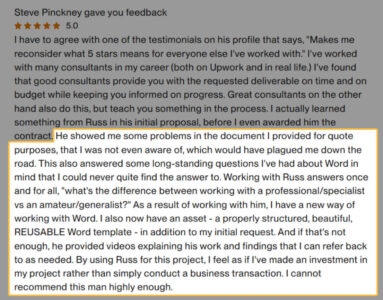
Steve Pinckney's Review

What happens next is entirely up to you:

  • Implement the fixes yourself (free to do so)
  • Engage our services for professional implementation
  • Or simply take the insights and run with them
Click Here to Get Your FREE Microsoft Word Template Assessment
  • HELP
    • Customer Support
    • Contacts
  • RESOURCES
    • About
    • Blog
    • Partners
  • LEGAL
    • Terms of Use
    • Privacy Policy
    • Legal Notice
    • Documentations
  • FOOTER MENU
    • Instagram Profile
    • Our Sitemap
    • Returns
    • Purchase Theme
  • Home
  • My GUARANTEE
  • About
  • Case Studies
  • Testimonials
  • Shop
    • Free Kindle Template
    • Free How to Self-Publish Book
    • Business Templates
    • Business Pack (BIG SAVINGS)
    • Fiction Templates
    • Non-Fiction Templates
    • Resumes
  • Courses
    • Introduction to Microsoft Word
    • Working with Word Images
    • Microsoft Word Fundamentals
    • Self-publishing on KDP
    • Free How to Self-Publish Book
    • Free Kindle Template
  • Blog
  • FAQs
  • Work with me
  • Wishlist
  • Compare
  • Login / Register
Sidebar
We use cookies to improve your experience on our website. By browsing this website, you agree to our use of cookies.
Accept